
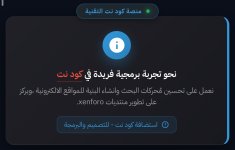
اضافة مربع ملاحظات او ترحيب كما موجود في منتدانا ، بطريقة جديدة وجميلة ، تدعم الهاتف والكمبيوتر .
معاينة الكود :
طريقة الشرح :
الدخول لوحة تحكم منتدى >> قائمة الجانبية >> الاعدادات >> الاعلانات >> اضافة اعلان
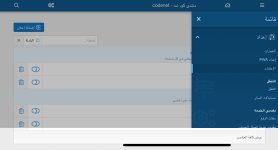
تكتب الاسم >> موقع ظهور العلان (إعلى) >> تضيف الكود هذا .
ملاحظة : الايقونة بصيغة SVG تدعم اصدار 2.3.5 واعلى يمكن تغيرها للاصدارات الادنئ .
مُقدم من مُنتدى كود نت
بواسطة اخوكم مهدي حميد .
معاينة الكود :
طريقة الشرح :
الدخول لوحة تحكم منتدى >> قائمة الجانبية >> الاعدادات >> الاعلانات >> اضافة اعلان
تكتب الاسم >> موقع ظهور العلان (إعلى) >> تضيف الكود هذا .
كود:
<div class="cn-modern-notice">
    <div class="cn-floating-header">
        <div class="cn-dot"></div>
        <span class="cn-title-modern">منصة كود نت التقنية</span>
    </div>

    <div class="cn-glass-card">
        <div class="cn-card-content">
            <div class="cn-main-phrase">
               نحو تجربة برمجية فريدة في <span class="cn-brand">كود نت</span>
            </div>
          <p class="cn-description">
           نعمل على تحـسين مُحركات البحث وانشاء البنية للمواقع الالكترونية ،ويركز على تطوير منتديات xenforo.
            </p>
            <div class="cn-footer-action">
                <a href="https://my.4r3.net/" class="cn-btn-modern">
                    <svg viewBox="0 0 24 24" width="14" height="14" fill="currentColor"><path d="M11 15h2v2h-2zm0-8h2v6h-2zm.99-5C6.47 2 2 6.48 2 12s4.47 10 9.99 10C17.52 22 22 17.52 22 12S17.52 2 11.99 2zM12 20c-4.42 0-8-3.58-8-8s3.58-8 8-8 8 3.58 8 8-3.58 8-8 8z"/></svg>
                     استضافة كود نت - للتصميم والبرمجة
                </a>
            </div>
        </div>
                <div class="cn-side-visual">
            <div class="cn-visual-circle">
                <svg viewBox="0 0 24 24" width="32" height="32" fill="white"><path d="M12 2C6.48 2 2 6.48 2 12s4.47 10 10 10 10-4.47 10-10S17.52 2 12 2zm1 15h-2v-6h2v6zm0-8h-2V7h2v2z"/></svg>
            </div>
        </div>
    </div>
</div>
<style>
/* تصميم كود نت الزجاجي الحديث - Modern UI */
.cn-modern-notice {
    direction: rtl;
    max-width: 550px; /* حجم صغير ولطيف */
    margin: 20px auto;
    position: relative;
    font-family: 'Segoe UI', Tahoma, sans-serif;
}
/* العنوان العائم الصغير */
.cn-floating-header {
    background: #1e272e;
    color: #3498db;
    display: inline-flex;
    align-items: center;
    padding: 5px 15px;
    border-radius: 50px;
    font-size: 11px;
    font-weight: bold;
    letter-spacing: 0.5px;
    border: 1px solid rgba(52, 152, 219, 0.3);
    margin-bottom: -15px;
    margin-right: 20px;
    position: relative;
    z-index: 2;
    box-shadow: 0 4px 10px rgba(0,0,0,0.3);
}
.cn-dot {
    width: 6px;
    height: 6px;
    background: #27ae60;
    border-radius: 50%;
    margin-left: 8px;
    box-shadow: 0 0 8px #27ae60;
}
/* البطاقة الزجاجية */
.cn-glass-card {
    background: linear-gradient(135deg, rgba(35, 35, 40, 0.9), rgba(25, 25, 30, 0.95));
    backdrop-filter: blur(10px);
    border: 1px solid rgba(255, 255, 255, 0.05);
    border-right: 4px solid #3498db;
    border-radius: 15px;
    padding: 25px 20px 20px 20px;
    display: flex;
    justify-content: space-between;
    align-items: center;
    box-shadow: 0 10px 30px rgba(0,0,0,0.5);
}
.cn-card-content { flex: 1; }

.cn-main-phrase {
    font-size: 16px;
    color: #fff;
    font-weight: 600;
    margin-bottom: 8px;
}

.cn-brand { color: #e74c3c; border-bottom: 2px solid rgba(231, 76, 60, 0.2); }

.cn-description {
    font-size: 13px;
    color: #a0a0a0;
    line-height: 1.6;
    margin: 0 0 15px 0;
}
/* زر الحركة */
.cn-btn-modern {
    display: inline-flex;
    align-items: center;
    gap: 6px;
    background: rgba(52, 152, 219, 0.1);
    color: #3498db;
    padding: 6px 12px;
    border-radius: 8px;
    font-size: 12px;
text-decoration: none;
    transition: 0.3s;
    border: 1px solid rgba(52, 152, 219, 0.2);
}
.cn-btn-modern:hover {
    background: #3498db;
    color: #fff;
}
/* الأيقونة الجانبية */
.cn-visual-circle {
    width: 50px;
    height: 50px;
    background: linear-gradient(135deg, #3498db, #2980b9);
    border-radius: 50%;
    display: flex;
    align-items: center;
    justify-content: center;
    margin-right: 15px;
    box-shadow: 0 8px 20px rgba(52, 152, 219, 0.3);
}

/* تحسين الجوال */
@media (max-width: 480px) {
    .cn-glass-card { flex-direction: column-reverse; text-align: center; }
    .cn-visual-circle { margin: 0 0 15px 0; }
    .cn-floating-header { margin-right: 0; right: 50%; transform: translateX(50%); }
}

</style>مُقدم من مُنتدى كود نت
بواسطة اخوكم مهدي حميد .
التعديل الأخير بواسطة المشرف:


