

"في إطار تطوير أدوات إدارة المحتوى، ظهرت تقنيات برمجية تسهّل التعامل المباشر مع الصور داخل الصفحات دون الحاجة إلى خطوات إضافية. من أبرز هذه الحلول إضافة زر "حذف" فوري بجانب كل صورة في صفحة "أحدث الصور"، مما يختصر الوقت والجهد ويتيح للمستخدم إزالة الصورة المحددة حتى لو تكررت داخل نفس المساهمة، مع تنفيذ العملية بسلاسة ودون إعادة تحميل الصفحة. هذه الميزة تعكس التوجه نحو جعل تجربة الإدارة أكثر سرعة ومرونة."
ملاحظة هامة: حذف الصورة نهائي ولا يمكن التراجع عنه إلا بإعادة وضعها في الموضوع مره اخرى.
ملاحظة هامة: حذف الصورة نهائي ولا يمكن التراجع عنه إلا بإعادة وضعها في الموضوع مره اخرى.
معاينة عمل الكود
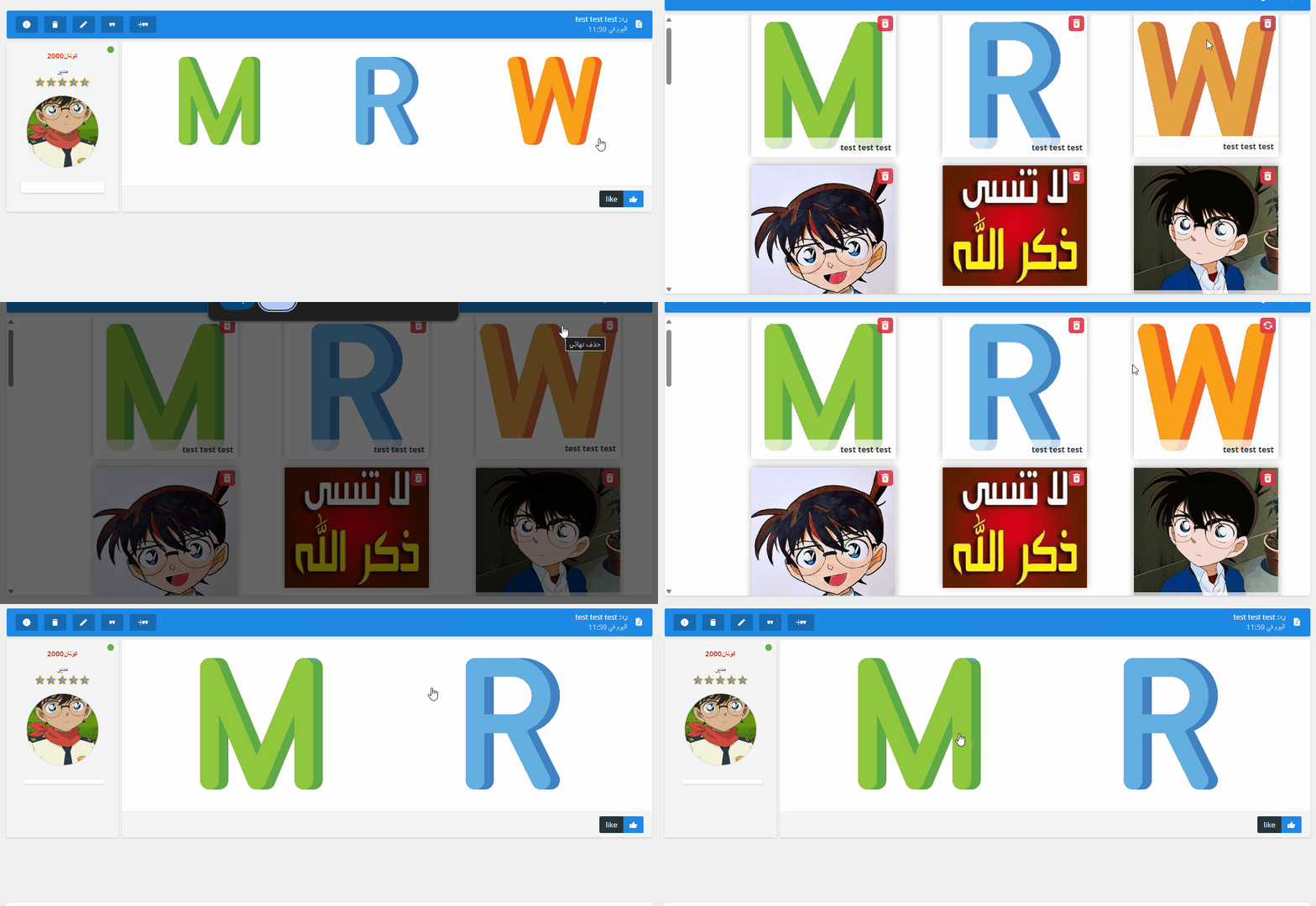
تركيب الكود
يتم وضع الكود في (لوحة الإدارة > عناصر إضافية > إدارة أكواد Javascript) في جميع الصفحات.:
JavaScript:
$(function () {
  if (!$('link[href*="material-icons"]').length) {
    $('head').append('<link rel="stylesheet" href="https://fonts.googleapis.com/icon?family=Material+Icons" />');
  }

  const observer = new MutationObserver(() => {
    $('.image_item').each(function () {
      const $item = $(this);
      if ($item.find('.btn-delete-ajax').length) return;
      const link = $item.find('a.text_overlay').attr('href');
      if (!link) return;
      const postIdMatch = link.match(/[#rp](\d+)/);
      const topicIdMatch = link.match(/\/t(\d+)-/);
      const postId = postIdMatch ? postIdMatch[1] : null;
      const topicId = topicIdMatch ? topicIdMatch[1] : null;
      if (!postId && !topicId) return;
      const imageUrl = $item.find('img').attr('src');
      const deleteBtn = $(`
        <div class="btn-delete-ajax" title="حذف نهائي" style="
          position: absolute; top: 5px; right: 5px; z-index: 10;
          background: rgba(220, 53, 69, 0.9); border-radius: 5px;
          padding: 4px; cursor: pointer; color: #fff;">
          <i class="material-icons" style="font-size: 20px; display: block;">delete_forever</i>
        </div>
      `);

      $item.css('position', 'relative').append(deleteBtn);
      deleteBtn.on('click', function (e) {
        e.preventDefault();
        if (!confirm('هل أنت متأكد من حذف هذه الصورة المحددة فقط؟')) return;
        const $icon = $(this).find('i');
        $icon.text('sync').css('animation', 'spin 1s linear infinite');
        const editUrl = postId ? `/post?p=${postId}&mode=editpost` : `/post?t=${topicId}&mode=editpost`;
        $.get(editUrl, function (data) {
          const $html = $(data);
          const $form = $html.find('form[name="post"]');
          let message = $html.find('textarea[name="message"]').val();
          if (!message || !$form.length) {
            alert('خطأ في الوصول للمحرر.');
            $icon.text('delete_forever').css('animation', 'none');
            return;
          }
          const imgFileName = imageUrl.split('/').pop().split('?')[0];
          const escapedFileName = imgFileName.replace(/[.*+?^${}()|[\]\\]/g, '\\$&');
          const regex = new RegExp(`(\\s*\\[img\\])?[^\\s\\]]*${escapedFileName}[^\\s\\[]*(\\[\\/img\\])?\\s*`, 'i');
          let newMessage = message.replace(regex, '\n').trim();
          if (newMessage.length < 2) {
            newMessage = ".";
          }

          let postData = $form.serializeArray();
          postData = postData.map(field => {
            if (field.name === 'message') field.value = newMessage;
            return field;
          });
          postData.push({ name: 'post', value: 'إرسال' });

          $.ajax({
            url: '/post',
            type: 'POST',
            data: $.param(postData),
            success: function () {
              $item.fadeOut(500, function () { $(this).remove(); });
            },
            error: function () {
              alert('فشل الاتصال.');
              $icon.text('delete_forever').css('animation', 'none');
            }
          });
        });
      });
    });
  });

  const container = document.getElementById('imageList');
  if (container) observer.observe(container, { childList: true, subtree: true });

  if (!$('#spin-style').length) {
    $('head').append('<style id="spin-style">@keyframes spin {100% {transform: rotate(360deg);}}</style>');
  }
});
تمت كتابة الكود بواسطة: كونان2000 بالذكاء الاصطناعي
منقول من منتدى الدعم والمساعدة